
Build a course
Profiles
A profile bundles the AI accounts, BookStack instances, models, language, content defaults and prompt wording a course is written with.
A profile is the reusable part of a course: who writes it, with which models, in which language, in which house style, and which wikis it may publish into. Several courses can share one profile; changing the profile changes all of them, except where a course has decided otherwise.
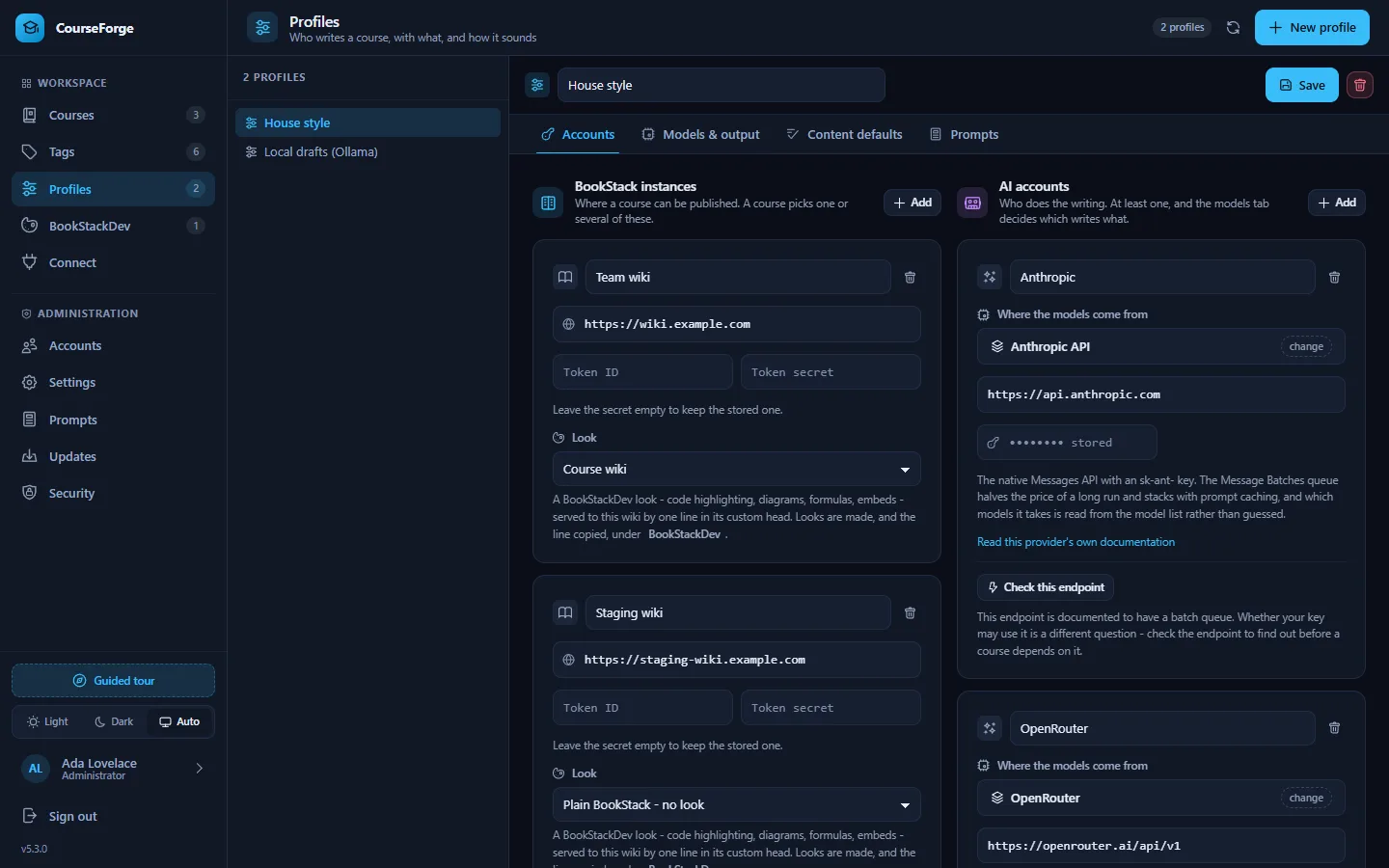
Open Profiles in the sidebar and click New profile. A profile has four tabs: Accounts, Models & output, Content defaults and Prompts.
Accounts#
BookStack instances#
Add one per wiki: a name, the base URL, and an API token id and secret. Create the token in BookStack under your profile › Access & security › API tokens, for a user allowed to create books, chapters, pages and shelves.
It is worth adding more than one instance even for a single course - a staging wiki and the live one, say. A course chooses which of the profile's instances it publishes into, and it may choose several. See Publishing.
Each instance card has a Look select: the BookStackDev configuration that wiki wears, which decides how it renders code, diagrams and formulas.
AI accounts#
Add one or more. Every account has a type, and the fields change with it:
| Type | What it needs |
|---|---|
| OpenAI | An OpenAI API key. The model picker is curated, because /v1/models mixes embeddings, audio and every fine-tune in with the chat models. |
| Anthropic API | An sk-ant- key. The native Messages API and the Message Batches queue. |
| Google Gemini (beta) | A Gemini API key. The native generateContent API - see the note about Google's key migration on AI providers. |
| OpenRouter | One key for every vendor OpenRouter fronts. Model ids carry a vendor prefix, as in anthropic/claude-opus-5. |
| A preset | A gateway that speaks /chat/completions: Groq, DeepSeek, Together, Fireworks, xAI, Mistral, Cerebras, DeepInfra, Nebius, Moonshot, Z.ai, a LiteLLM proxy, or the local servers Ollama, LM Studio, vLLM and llama.cpp. The address and quirks are filled in; the local ones need no key. |
| Custom OpenAI-compatible endpoint | Any base URL you type, with nothing assumed. CourseForge probes it for a model list and a batch queue without spending anything. |
Check this account proves an account works before a course depends on it: it fetches the model list, and for anything with a batch queue it records what that queue can do for this key - which is a different question from what the endpoint offers in general. See AI providers for what each type supports.
Note
Secrets never travel back to the browser. A stored key shows as •••••••• stored; leaving the field empty on save keeps it. A stored key is only kept for the address it was stored against: change the base URL and the key has to be entered again, so a key can never be redirected somewhere new by editing the field beside it.
Until Administration › Security has passed, key and token fields are locked with a red mark.
Models & output#
Two model slots#
| Slot | What it does | Advice |
|---|---|---|
| Outline | Designs and revises the course outline, and plans page scopes. | One request per course. Use your strongest model. |
| Pages | Writes every page. | Hundreds of requests. A good mid-range model is usually the right trade. |
Each slot has its own account, so the outline can come from Anthropic and the pages from a cheaper gateway. The model box is a fuzzy search; fetch list pulls the live list from the provider. You can always type a model id by hand.
Each slot also has a temperature and a token ceiling. The ceiling caps the length of one answer; leave it at 0 for the provider's own maximum. The temperature does not apply to Claude: since 5.3 CourseForge speaks Anthropic API version 2026-10-21, which refuses sampling parameters on every model, so none is sent. OpenAI's reasoning models refuse it as well, and CourseForge leaves it out for them.
The batch switch#
Under the page slot, write these pages through the provider's batch queue appends :batch to the model id. That is CourseForge's marker for bulk generation at about half price: a run started on this profile goes to the provider's queue and comes back within a day. It is offered on the page slot only, and it is disabled - with the reason underneath - when the account cannot queue. Where the provider publishes which models its queue accepts, they are listed with the chosen one highlighted. See Runs.
Regenerating a single page from the editor always runs live, whatever the slot says.
Language, parallelism, punctuation#
- Course language: what every course on this profile is written in. A fuzzy list, or type any language at all.
- Pages in parallel: how many pages the in-tab generator writes at once (default 2, up to 12). Background runs use the scheduler's worker count instead.
- Correct the punctuation of a generated page: sets quotation marks, apostrophes, dashes and spacing the way the course language does before a page is stored. On by default; see Punctuation.
Content defaults#
What every course on this profile starts from: the same elements and values as a course's Details tab, one level up, in the same editor. Only deviations are stored, so a profile that decides nothing passes the installation's defaults straight through, and a course that never disagreed with its profile follows it when it changes. This is where a house style lives - learning objectives on, a minimum length of 2,500 words, a standing audience. See Content details.
Prompts#
Every prompt CourseForge sends, grouped and documented, each overridable for this profile only - on top of whatever an administrator has set for the whole installation. The profile layer wins. A profile override that is deliberately left empty sends nothing at all for that slot, which is how you switch a block of instructions off. See The prompt library.
Several profiles#
Profiles are cheap; make one per purpose. Typical sets:
- House style - the production model, the live wiki, the content defaults your team agreed on.
- Drafts - a local model through Ollama for trying outlines out, with no publishing.
- Batch - the same as House style with the batch switch on, for large courses that can wait a day.
A course switches profile on its Settings tab.
Deleting a profile#
A profile cannot be deleted while a generation run is still open under it. A batch submitted with its credentials is collected with its credentials, and deleting the profile mid-run would leave that batch running - and billing - at the provider with nothing left here to collect it. Stop the run, or let it finish, and the profile can go. Courses that used a deleted profile go back to the installation defaults and need a new profile before they can generate.
Over MCP#
Everything on this screen has a tool: create_profile, update_profile, add_ai_account, delete_ai_account, add_bookstack_instance, delete_bookstack_instance, set_model_slot, set_profile_details, set_profile_prompts, list_providers and more. Keys can be replaced over MCP but never read. See the MCP tool reference.