
Build a course
The outline
How a course's chapters and pages are designed, written down as Markdown, revised and applied - and what a page scope is for.
The Structure tab is where a course gets its shape. The outline is plain Markdown: a title, a description, numbered chapters with a goal each, numbered pages, and a one-line scope under every page. The AI writes the first version from the course brief; you read it, change it and Apply it.
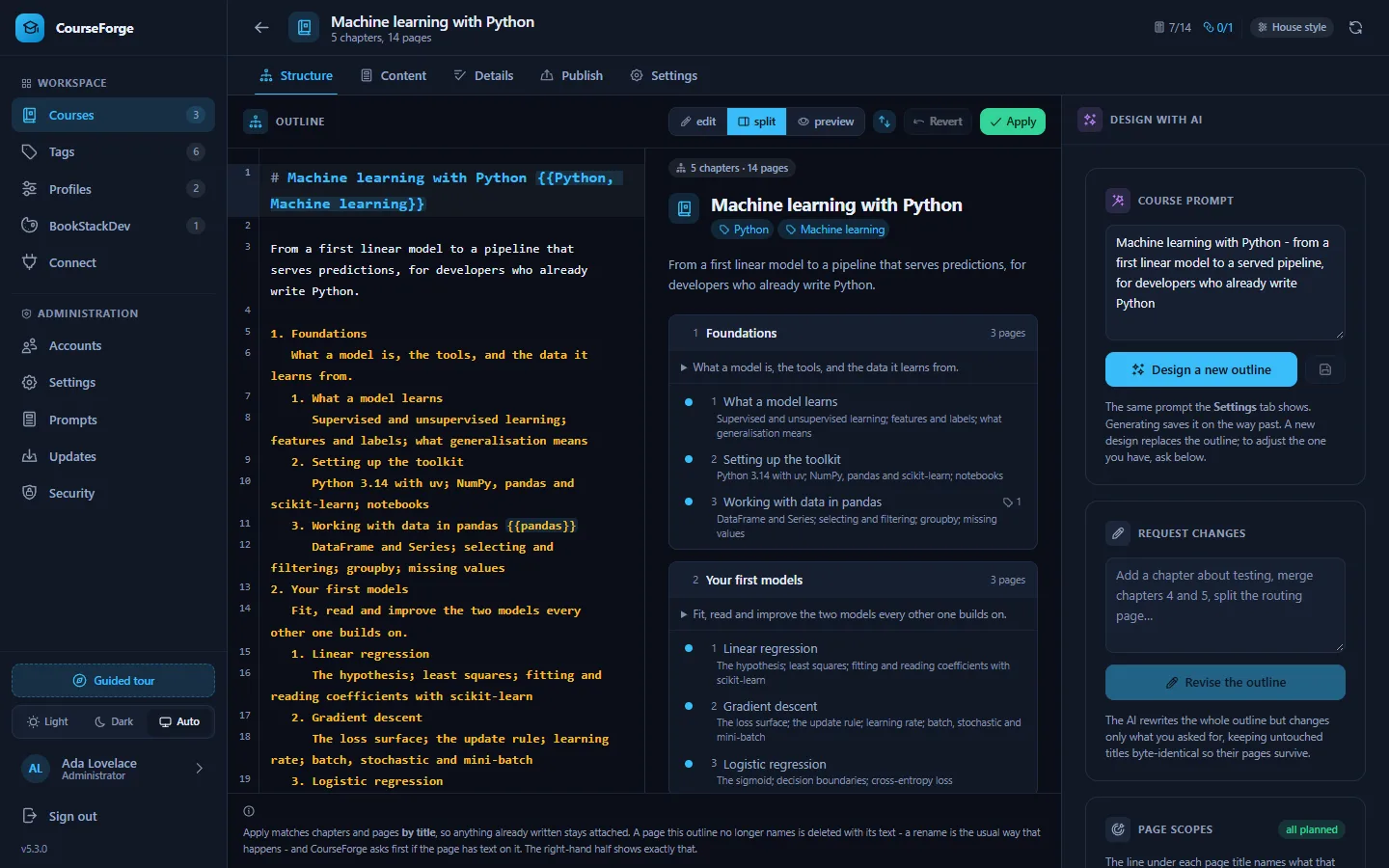
The screen#
The tab is a split view, like the Content tab's editor:
- Left: the outline in a Markdown editor, highlighted as Markdown with the
{{Tag, Tag}}markers picked out. - Middle: what Apply would make of it, parsed as you type: the book title and its tags, the description, one box per chapter with its pages numbered and their scopes underneath, and a count of what is new, moved and kept. A page the outline no longer names is listed underneath in red, because applying deletes it - with its text.
- Right: the AI panel (a drawer behind the sparkle button on narrow screens): the course prompt, Design a new outline, Request changes, and Page scopes.
The two halves scroll together, passage for passage; the link button in the toolbar unlinks them, and edit and preview give either half the whole width.
The format#
# Machine learning with Python {{Python, Machine learning}}

From a first linear model to a pipeline that serves predictions,
for developers who already write Python.

1. Foundations
   What a model is, the tools, and the data it learns from.
   1. What a model learns
      Supervised and unsupervised learning; features and labels; generalisation
   2. Setting up the toolkit
      Python 3.14 with uv; NumPy, pandas and scikit-learn; notebooks
   3. Working with data in pandas {{pandas}}
      DataFrame and Series; selecting and filtering; groupby; missing values
2. Your first models
   Fit, read and improve the two models every other one builds on.
   1. Linear regression
      The hypothesis; least squares; fitting and reading coefficients
   2. Gradient descent
The loss surface; the update rule; learning rate; batch and mini-batch| Line | Means |
|---|---|
# Title |
The book title. Exactly one. |
| Paragraphs after the title | The book description, shown on the BookStack book. |
1. Title at the left margin |
A chapter. |
| Text indented under a chapter | The chapter's goal: what the chapter leaves the reader able to do. It is sent with every page of that chapter. Several paragraphs are fine. |
1. Title indented under a chapter |
A page. |
| A line indented deeper than a page | The page's scope. |
{{Tag, Tag}} behind a title, or on the line below |
Tags for the book, chapter or page. See Tags. |
The parser is forgiving, because models drift: it also accepts bullets instead of numbers, 1) markers, bold titles and stray blank lines. A list item that reads like a sentence - long, with a full stop - is treated as description rather than as a page, so a description paragraph that happens to begin "3. Install…" does not become a page. When CourseForge writes the outline back, it escapes description lines that look like list items.
Page scopes#
The scope is the most important line in the outline. It names what that page and no other page teaches:
2. Reactivity
   Hold state that the page follows.
   1. Reactive state with ref and reactive
      ref(); reactive(); when to use which; unwrapping in templates
   2. Computed values and watchers
      computed(); caching; watch(); watchEffect()
Every page is written knowing every other page's scope - the course map. So the page on ref sees that watch() belongs to the next page, and mentions that page instead of teaching watch() a second time. Scopes are how a course of a hundred independently written pages stays free of repetition.
Where scopes come from:
- Designing an outline produces them: the outline prompt asks for scopes that divide the subject between the pages without overlap. That request is the one moment anything sees the whole course at once.
- Plan missing scopes in the AI panel fills them in, in one request for the whole course, for every page that has none - an outline from before 5.3, or pages you added by hand. The circular button next to it plans every page afresh.
- You can write or edit a scope like any other line of the outline, or in the Content tab's context inspector, where it sits above the page's extra context.
The preview shows each scope under its page and counts the pages that have none. A page with no scope is still written - it is told to work out its share from its title and the course map - but planned scopes divide a subject far more cleanly.
Tip
Good scopes are lists of concrete concepts separated by semicolons, not sentences: "computed(); caching; watch(); watchEffect()". They cost a few tokens per page on every page of the course, so short is good.
Designing and revising#
Design a new outline sends the course prompt (the brief, which you can edit in the panel or on the Settings tab) to the profile's outline model and puts the answer in the editor. Nothing is applied until you click Apply.
Request changes asks the AI to revise the existing outline instead: "merge chapters 4 and 5", "add a chapter on testing before deployment", "make the pages shorter and more numerous". The AI is told to reproduce every title it does not change character for character, because titles are what keep written pages attached (below).
If the course has web research switched on, the outline is designed from the stored research briefing, so a course about a library is built around its current version. See Research.
Applying: matching by title#
Apply parses the Markdown into chapters and pages, and matches them against what the course already has by title:
- A page whose title did not change keeps its content, its tags, its content details and its publishing record, wherever it moved to.
- A page with a new title is new.
- A page the outline no longer names is deleted with its text.
So a rename detaches a page's content deliberately. The preview shows the renamed page as new and the old one as removed, in red - that is the moment to notice. If you want to rename a written page and keep its text, rename it in the Content tab's chapter or page editor instead: that renames the row and rewrites the outline for you.
If the outline cannot be parsed into at least one chapter, nothing is changed at all. An AI answer that is not an outline can never wipe a course.
Warning
Over MCP, apply_structure refuses to delete pages that already have text unless the client confirms it - and clients on the 2026-07-28 protocol revision are asked the question interactively. In the browser, the red list in the preview is your confirmation.
The outline and the published book#
The book title and description go onto the BookStack book; chapter goals become chapter descriptions; tags become BookStack tags. Scopes are not published: they are instructions for the writer, not text for the reader.
Over MCP#
| Tool | Does |
|---|---|
get_structure_brief |
The prompt CourseForge would send to design an outline, for a client to design it itself. |
preview_structure |
Parses an outline and reports what applying it would create, keep and delete. |
apply_structure |
Applies an outline. |
generate_structure |
Has the course's own model design or revise the outline. Spends credit. |
plan_page_scopes |
Plans the scope of every page that has none (all for every page). Spends credit. |
See the MCP tool reference.